Draft formatting lost after reload — line breaks are removed
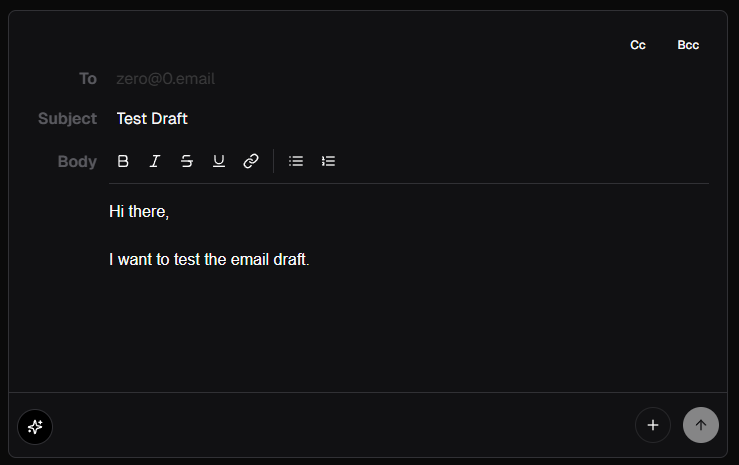
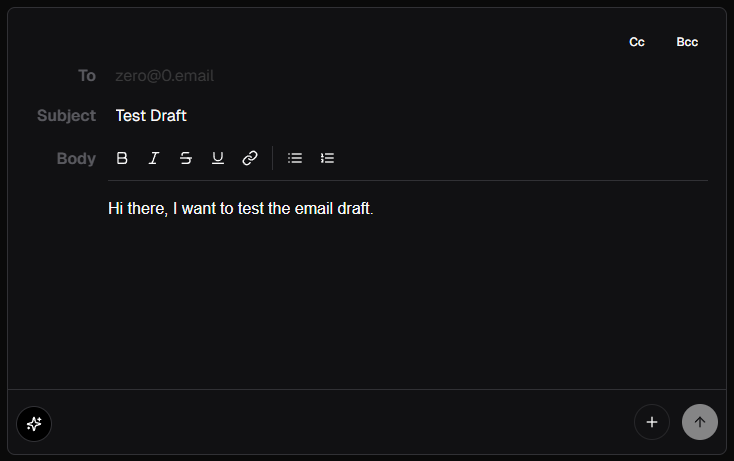
When composing an email and saving it as a draft, line breaks between paragraphs are lost after reloading the page. This causes multiple lines to be merged into a single line, which is different from the original formatting.
Steps to Reproduce
Create a new email draft.
Write some text with an intentional line break (e.g., after a greeting line).
Save the email as a draft (autosave).
Reload the page or revisit the Drafts folder.
Open the saved draft.
Expected Result:
The draft should preserve the original formatting, including line breaks.
Actual Result:
The draft merges previously separated lines into a single line, losing intended formatting.
Screenshot
Before:
After Reload:
Log in to comment and vote
Comments3
Noppakorn Kaewsalabnil
Apr 20, 2025
My bad, clicked the wrong board. I'll report the bug.